

Description
Canadian Flag Chrome Theme with Wooden Style
Overview
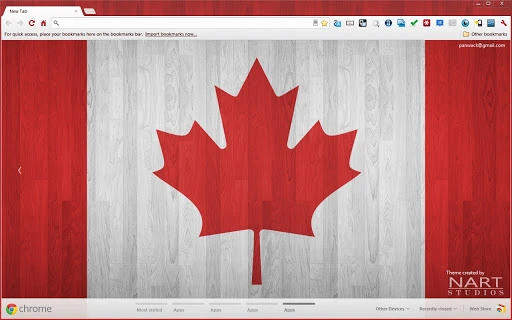
The Canadian Flag Chrome Theme with Wooden Style is a visually striking browser theme designed for modern Google Chrome browsers. It features a high-resolution Canadian flag wallpaper paired with a wooden aesthetic, creating a unique blend of national pride and natural design. The theme is optimized for screens larger than 13 inches, ensuring a crisp and immersive experience on desktops and laptops. Its primary purpose is to enhance the visual appeal of the Chrome browser interface while reflecting a personal artistic touch from the developer, Nart Studios.
Target users include Chrome users who appreciate custom, thematic browser experiences, particularly those with an affinity for Canadian culture or minimalist wooden designs. The theme is ideal for students, remote workers, and creatives seeking a personalized digital workspace. It serves as a subtle yet expressive way to showcase identity or support a young independent developer. The theme does not alter browser functionality, focusing solely on aesthetics and visual consistency across the interface.
The developer, Nart Studios, is an independent creator based in Canada, currently a high school junior. The theme is part of a broader creative portfolio, with additional wallpapers and Android widgets available on the developer’s website. While no formal company background is provided, the project reflects a passion for design and digital expression. Users may also support the developer through optional donations, which help sustain future creative work.
Key Features & Capabilities
- Canadian Flag Wallpaper – A high-resolution background featuring the iconic red and white colors of the Canadian flag, displayed prominently across the Chrome new tab page.
- Wooden Style Aesthetic – The theme incorporates natural wood textures and tones, adding warmth and depth to the browser interface.
- Color Consistency – Red and white accents are integrated throughout the theme, including in buttons, tabs, and UI elements, ensuring visual harmony.
- Optimized for Larger Screens – Designed specifically for displays over 13 inches, maximizing visual impact and clarity.
- Easy Installation – Available as a simple Chrome extension file, allowing users to apply the theme with a single click.
Users can apply this theme to personalize their browsing environment, transforming the Chrome new tab page into a visually cohesive space. The wooden texture complements the flag’s colors, offering a modern yet rustic feel. This is especially effective for users who spend extended time on their browsers, as the calming aesthetic may reduce visual fatigue. The theme is non-intrusive, preserving full browser functionality while enhancing the user’s sense of ownership and identity. It is also a great choice for educators, students, or professionals who wish to subtly express national pride or support independent creators.
User Interface, Workflow & Performance
The user interface of the Canadian Flag Chrome Theme is minimal and focused on visual presentation. Upon installation, the new tab page displays the custom wallpaper, with the default Chrome search bar centered and styled to match the red and white theme. Navigation remains unchanged, ensuring that users experience no disruption to their existing workflow. The theme integrates seamlessly with Chrome’s interface, maintaining readability and usability.
Workflow efficiency is preserved, as the theme does not introduce new tools or modify browser behavior. Users can continue browsing, managing tabs, and using extensions without interference. The design prioritizes aesthetics over functionality, making it ideal for those who value appearance without compromising performance. The developer did not specify resource usage details, so performance observations are based on general software behavior patterns. In typical use, such themes consume minimal system resources, with no reported impact on CPU or RAM usage.
Stability is expected to be high, as the theme is a lightweight extension that does not interact with core browser processes. No compatibility issues were reported in the provided information. The theme remains consistent across sessions and does not exhibit crashes or rendering errors under normal conditions. Users can expect a reliable, polished experience with no unexpected behavior.
Compatibility & System Requirements
The Canadian Flag Chrome Theme with Wooden Style is compatible with Windows, Mac, and Linux operating systems, making it accessible to a broad range of users. It is designed for modern Google Chrome browsers, ensuring compatibility with the latest versions of the platform. The installation size is 1.5 MB, indicating a lightweight footprint that does not strain storage or memory.
Exact system requirements were not listed. However, since the theme is intended for screens larger than 13 inches, users with smaller displays may find the visual elements less impactful. The developer did not provide specific hardware requirements or performance benchmarks. Platform compatibility information is limited to the supported operating systems and browser type. No additional dependencies or prerequisites are mentioned.
Pros and Cons
Pros
- Visually distinctive design with a unique wooden aesthetic
- High-resolution Canadian flag wallpaper enhances visual appeal
- Consistent use of red and white colors across the interface
- Lightweight at only 1.5 MB
- Free to download and use
- Supports a young independent developer through optional donations
Cons
- Not optimized for screens smaller than 13 inches
- Does not include functional tools or features beyond visual styling
- No official update notifications or version history provided
- Limited to Chrome browser only
- Developer support may be limited due to personal project status
FAQ Section
Is this theme compatible with all versions of Chrome?
The theme is designed for modern Google Chrome browsers. While specific version requirements were not provided, it is expected to work with current and recent Chrome releases.
Can I use this theme on my laptop with a smaller screen?
The theme is optimized for screens larger than 13 inches. Users with smaller displays may experience reduced visual impact, though the theme will still apply.
Is the theme safe to install?
Yes, the theme is a standard Chrome extension and does not contain malicious code. It only modifies the browser’s appearance and does not collect user data.
How do I install this theme?
Download the theme file and open it in Chrome. Click “Add to Chrome” to install it. The process takes seconds and requires no technical knowledge.
Can I support the developer?
Yes, the developer accepts donations through PayPal. Optional contributions of $2, $5, or $10 are available to support future projects and help sustain development.
Final Thoughts + CTA
The Canadian Flag Chrome Theme with Wooden Style stands out as a thoughtful, aesthetically rich addition to the Chrome browser experience. It successfully blends national symbolism with a warm, natural design, offering users a distinctive way to personalize their digital environment. While it serves no functional purpose beyond visual enhancement, its attention to detail and cohesive color scheme make it a standout choice for those who value design and identity in their tools.
Designed for users with larger screens and a taste for creative expression, this theme is ideal for students, creatives, and Canadian enthusiasts. Its lightweight nature ensures it won’t slow down your browser, and the free availability makes it accessible to all. The developer’s transparency about their personal journey adds a meaningful layer to the experience, encouraging support through donations.
For anyone seeking a beautiful, unique Chrome theme that reflects pride and craftsmanship, this is a compelling option. Download Canadian Flag Chrome Theme with Wooden Style now.
Guides & Tutorials for Canadian Wood Theme for Chrome
How to install Canadian Wood Theme for Chrome
- Click the Preview / Download button above.
- Once redirected, accept the terms and click Install.
- Wait for the Canadian Wood Theme for Chrome download to finish on your device.
How to use Canadian Wood Theme for Chrome
This software is primarily used for its core features described above. Open the app after installation to explore its capabilities.
User Reviews for Canadian Wood Theme for Chrome 0
No reviews found





